|
The
<goto>
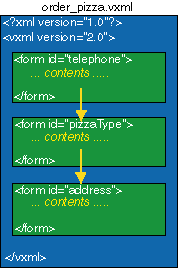
element can be used to transition to another
form item in a current form, another <form>
(dialog) in the current document, to another
document, or to another form in another
document. The syntax for the use of this
element is as follows:
Transitioning to a form item within a form
<goto
nextitem="some_form_items_var_name"
/>
Transitioning
to another form in the current document
<goto
next="#some_form_id" />
Transitioning
to another document
<goto
next="http://www.some_url.com/some_doc.vxml"
/>
One
may also dynamically resolve the URI and
URI fragments by using the expr attribute
and an ECMAScript expression:
<goto
expr="'../some_app/' + filenamevar
+ '.vxml'" />
Exercise
for the student
In
the following code, select the appropriate
command from the pulldown menu to transition
from the "telephone" form to the
"pizzaType" form.
|